For years Hong Kong's new virtual banks could not be used in AlipayHK, while cards from older banks could. In 2025, a guide reported that AlipayHK began to accept ZA Bank's account and debit card. This guide walks through the steps as reported, then explains the quirks and safety checks.
The steps
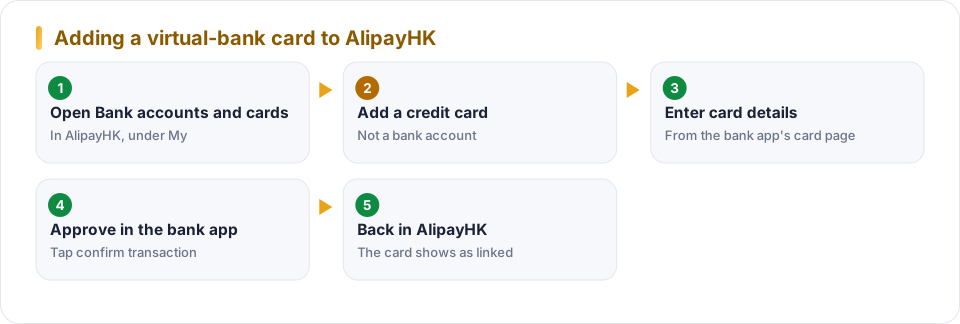
Open the cards page
In AlipayHK, tap My, then Bank accounts and credit cards, then the plus at the top right.
Choose credit card
Pick the credit-card option, not a bank account. The guide explains that the card behaves like a credit card with a zero limit.
Enter the card details
Use the card number, expiry date and security code shown in the bank app's card details. The card must be activated, and numbers are typed in groups of four.
Approve in the bank app
AlipayHK asks you to complete verification in the bank's own app. Open the bank app quickly. A banner or notification asks you to confirm the transaction.
Check the result
Back in AlipayHK, the card should appear in the list. You can now use it for taxis, delivery and online shops that accept the wallet.
Why it works this way
Wallets and banks talk to each other through card networks. When the wallet treats a card as a credit card, it asks the issuing bank to approve a verification through the bank's own channel. Your bank app is therefore the safety check, not the wallet.
- Zero-limit card
- A card with no credit line. It exists as a payment credential tied to a deposit account, often a debit card.
- Tokenisation
- Replacing your real card number with a stand-in the wallet can use, so the number is not exposed in each payment.
When it fails
No prompt in the bank app
Check notifications, update the app and keep the wallet open.
Declined card
Make sure the card is activated, the details are right and your balance is available.
Bank not supported
Check the wallet's list of supported banks. Support differs by bank and changes.
Prompt you did not start
Deny it, do not share any codes and contact your bank.
Planning a trip? See the Hong Kong trip kit.
Keep it safe once it works
The Hong Kong Monetary Authority advises keeping e-wallets and passwords safe, reading the terms and fee schedule, checking your transaction record for anything you did not make, and holding only the balance you plan to use. For a linked card that means a few habits.
Set a spending limit in the bank app
A low daily limit caps the damage if the phone is lost.
Check the first few payments
Open the transaction list after your first purchases and make sure the amounts and merchants are right.
Know how to cut it off fast
If the phone is lost, freeze the card in the bank app and remove it from the wallet, then contact the bank.
Questions people ask
Why do I pick 'credit card' for a debit card?
The guide reports that the Hong Kong virtual bank's card is processed like a credit card with a zero limit. The wallet therefore lists it under cards, not bank accounts.
What if the confirmation never appears in my bank app?
Check that the bank app is up to date, notifications are on and you have signal. If a prompt does not show, restart both apps and try again, then contact the bank.
Is it safe to type my card details into a wallet?
Only into the official AlipayHK app. Type nothing into links in messages. The transaction approval in your bank app is the key safety check.
Sources
Written from these pages and checked against them on October 6, 2026. Programs and rules change, so check the provider’s current terms before you decide.
General information, not financial, legal or travel advice. Your own card terms and the provider’s current rules always come first.