Replacing a phone used to mean moving a SIM card. With an eSIM there is no card, so the carrier's rules decide what happens, and they differ more than most people expect. This guide sorts the carriers listed in a 2025 digital-nomad guide into four patterns, so you know which one you are about to meet.
The four patterns
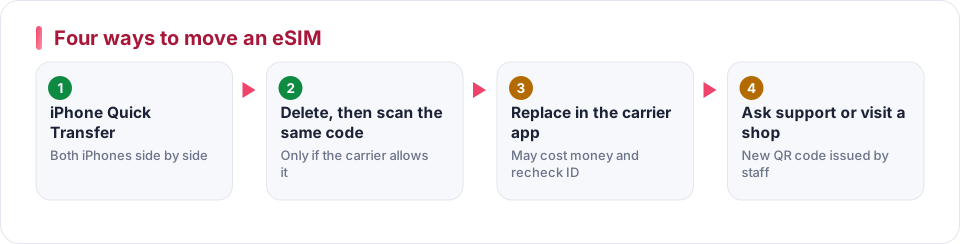
Quick Transfer
iPhone to iPhone. Add the eSIM on the new phone and choose to transfer from the nearby iPhone. Listed as supported by SoftBank, NTT Docomo, KDDI, T-Mobile US, Telekom Germany, Vodafone UK and Dialog.
Delete, then scan again
Delete the eSIM while the old phone is online, then scan the original QR code on the new phone. Works for One NZ, Globe and Smart in the Philippines, Vodafone Ireland, Google Fi, Elisa, Lifecell, Spusu and others.
Replace in the app
The carrier app orders a replacement eSIM. Listed for 3HK, Club, CMHK, Yoodo, Tunetalk, Ooredoo, Singtel, Giffgaff, Three UK, Orange Flex, Yallo, Felix and AmaySIM.
Support or shop
You ask staff for a new QR code. Listed for CUniq, Taiwan carriers, DITO, AIS, Telstra, Optus, Helium and US Mobile.
Carrier notes worth knowing
| Carrier | What to do | Watch for |
|---|---|---|
| 3HK (Hong Kong) | App, "replacement SIM" | HK$28 per swap, identity checked again |
| CUniq (Hong Kong) | New QR code in a shop | Shop visit needed |
| Vodafone Germany | Delete, then scan the old QR code or fetch it in MeinVodafone | Keep your PIN |
| Vodafone UK | iPhone Quick Transfer, or delete and use the emailed code on Android | Email attachment password is usually the holder's birth date |
| Giffgaff, Three UK | App: replace SIM, switch to a new eSIM | None |
| T-Mobile US | iPhone Quick Transfer, or call support with the account PIN on Android | Have the PIN ready |
| Tello (US) | Log in to the account and download a new QR code | Check the account page |
| Singtel | m2u app, change eSIM | App only |
| Zelta (Latvia) | App swap | 3 euros per replacement |
| AIS (Thailand), DITO (Philippines) | Contact support | New QR code from staff |
The full list was compiled by readers and carrier pages change, so confirm in your carrier's app or help page before you act.
The day you switch
Find your carrier's pattern
Use the list above or search your carrier's help pages for "eSIM transfer".
Keep the activation details
Store the original QR code, activation email and any PIN until the new phone is working.
Make sure the new phone is eSIM-ready
Check that it is unlocked and supports the carrier's network. See eSIM explained.
Move the profile
Follow the pattern. If the carrier charges, do it once and test straight away.
Test calls, text and data
Send a text and open a web page before you wipe or sell the old phone. See eSIM activation and troubleshooting.
Questions people ask
Can I move an eSIM from an iPhone to an Android phone?
Quick Transfer works between iPhones. Between platforms you normally need a new QR code or a replacement from the carrier, so use the carrier's app or support.
What if the old phone is lost or broken?
Contact the carrier. With app-based replacement you can swap without the old phone. If the carrier needs a shop visit, take identification.
Do I lose my number when the eSIM is replaced?
No. The number belongs to the account, not the profile. But a replacement can take the old profile out of service immediately, so check coverage on the new phone before you leave the old one.
Sources
Written from these pages and checked against them on October 6, 2026. Programs and rules change, so check the provider’s current terms before you decide.
General information, not financial, legal or travel advice. Your own card terms and the provider’s current rules always come first.